

Follow up an outstanding fee
Check what is still unpaid, assign collection work and follow up with the club. Not invoiced yet? Start with the optional preparation.
An issued invoice, its agreed terms and any confirmed payment evidence.
Not invoiced yet? Prepare the agreement and installments
Retain the executed agreement, relevant clause, fee, stored currency, payment trigger and due dates. Proposed wording and executed terms are different records. Entekka does not automatically extract signed Legal terms into a commission schedule.
Legal has two separate entry points: Create contract for a supported drafting workflow, and Upload for review for a received searchable PDF. Review findings with the assigned reviewer. Drafting-library policies vary: some internal pilot drafts remain blocked from external sharing and signature even after human review.
- In Finance → Planning → Commission planning, use Add schedule for the signed Deal and record the contractual installments.
- When an installment is earned and its checks are satisfied, use Mark earned, then Mark invoice ready.
- Use Create draft invoice on a ready, uninvoiced installment. Review its recipient, amount, currency, issue date and due date.
- Prepare or attach the invoice document and deliver it through the appropriate channel. Mark as sent records status; it does not send an email. You can also use Add invoice to record one already issued.
Step 1 of 4
Find the invoice and check its context
Start with the recipient, invoice reference, agreed document and due date. Check the payment trigger against the completed agreement, not an earlier proposal or an AI review finding.
In Entekka
Finance → Invoices → Invoice details
Search by invoice, club, player or owner. Use Overdue to focus on past-due invoices, then open the invoice reference. Review its context, file, total, collected amount and outstanding balance in the stored currency.
You can tell whether the invoice is issued, what is unpaid and which source terms to check. A draft is not an issued receivable.
What if the invoice is missing or still a draft?
Open “Not invoiced yet?” before step 1 for the agreement and installment path, or use Add invoice to record an invoice already issued. Check the recipient, amount, currency and dates before following up. Upload the supporting invoice file when it is missing.
Step 2 of 4
Record only confirmed payments
Keep evidence of money received, including the amount, date and reference. Review existing payment history before adding a record so the same receipt is not counted twice. Keep currencies separate.
In Entekka
Invoice details → Payment history → Record payment
When receipt is confirmed, record the payment against this invoice, including partial payments. Check the updated collected amount and outstanding balance after saving.
A €25,000 invoice with a confirmed €5,000 payment has €20,000 outstanding. A promise or expected payment leaves the balance unchanged.
Record payment logs money already received. It does not initiate a transfer or reconcile a bank account.
What if the club says it will pay next week?
Keep the amount unpaid. Record a Payment promise in Collection work with its amount, promised date and the contact’s confirmation. Record payment only when receipt is confirmed.
Step 3 of 4
Assign the collection owner and action
Distinguish the colleague collecting the fee from the club finance contact. Give them the outstanding balance, latest response, a specific question and the next date. Record a dispute or promised payment date as its own context.
In Entekka
Invoice details → Collection work
Choose Manage collection work for a new case, or Edit collection work for an existing one. Set the Collection owner, Next action and Next action date. Record a dispute or Payment promise separately from a received payment.
Finance and the linked Club invoice share the collection case and timeline. Internal follow-up does not send a message automatically.
What if no collection case has been started?
Choose Manage collection work, enter the owner, action and date, then Open collection case. For an existing case, choose Edit collection work and Save collection work. Update that shared case so colleagues see the same plan.
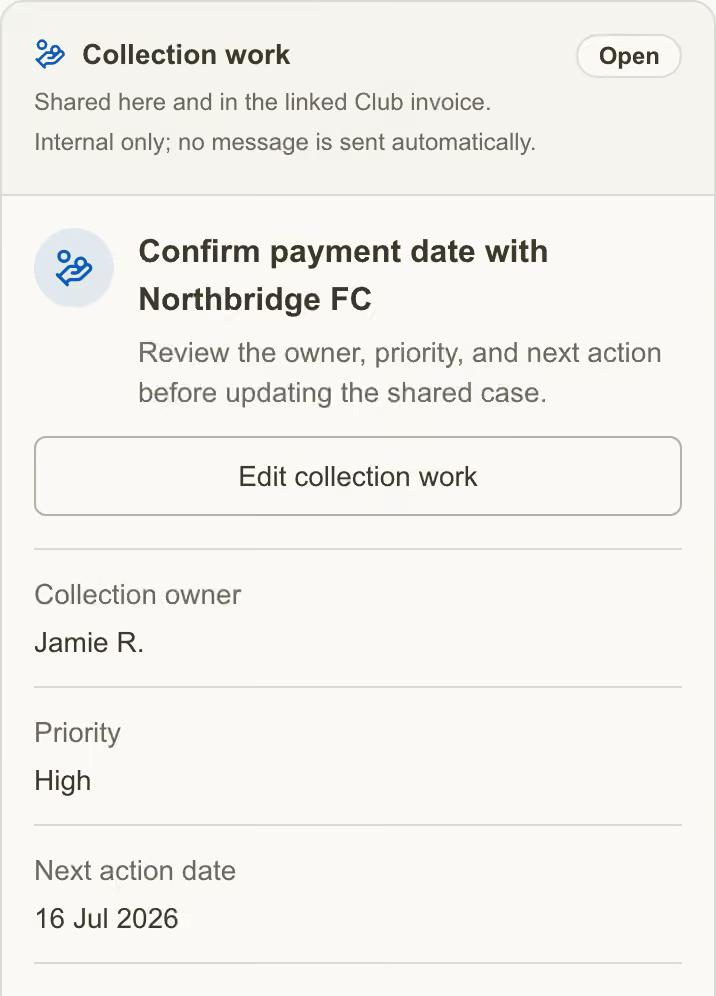
This existing case uses Edit collection work. Set the internal owner, next action and date, then Save collection work. Start a new case with Manage collection work. These fictional records illustrate the controls; the completed worksheet below is a separate example.
Step 4 of 4
Make contact and record the outcome
Review the outgoing message and contact the club through the appropriate channel. State the invoice, outstanding balance and question clearly, then keep the response with the collection work.
In Entekka
Collection work → Next action and payment promise
Update the next action and date with the contact outcome, or record the contact’s confirmation in a Payment promise. Saved case changes appear in the timeline. If money arrives, return to Record payment. Review the case and reminder state when the balance reaches zero.
The next person sees what happened and what remains to do. Completing a reminder or marking a promise kept is not a payment record.
What if the club disputes the fee or misses a promise?
Keep the receivable visible, record the dispute reason or update the promise outcome, and assign the next decision. Do not erase the balance or mark it collected because a conversation has ended.
Completed worksheet
The workflow in practice
The agreement, outstanding fee and follow-up stay connected.
- Invoice reference
- INV-041 · Northbridge FC · Issued. Agency agreement AG-017, first installment; due 15 July 2026.
- Outstanding amount
- €20,000 as at 16 July 2026: €25,000 invoiced less €5,000 confirmed received.
- Confirmed payments
- €5,000 received 14 July 2026 · Receipt reference PAY-014 retained in payment history.
- Club finance contact
- Morgan Lee · Northbridge FC finance team.
- Collection owner
- Jamie R. · Agency colleague responsible for collection.
- Follow-up date
- 16 July 2026 at 10:00 · Ask Morgan for the payment date for the remaining €20,000.
Next actionRecord Morgan’s response and any payment promise in Collection work. Keep €20,000 outstanding until further receipt is confirmed.
Finance owns invoice balances and recorded payments. The collection case is shared with the linked Club invoice. Legal review and agreement execution remain separate from invoice creation, message delivery and receipt of money.
See this workflow in Entekka Use the checklist and worksheetEntekka · Agency guides
Quick checklist
Follow up a fee
Check the four essentials, then adapt the worksheet to your own work.
See a completed exampleUse your browser’s Print command for this worksheet.
Prints the checklist and all six writing prompts.- The issued invoice points back to the agreed terms.
- The outstanding balance reflects confirmed recorded payments.
- The club finance contact and internal collection owner are distinct.
- The next collection action has a question, an owner and a date.
Your fee follow-up worksheet
6 prompts · Notes or print
Use these prompts in your own notes, or print the worksheet to fill them in. This page does not save your answers.
- Invoice reference
- Invoice, recipient, agreed document and due date.
- Outstanding amount
- Balance, currency and date checked.
- Confirmed payments
- Amounts, dates and supporting evidence.
- Club finance contact
- Name and appropriate contact channel.
- Collection owner
- Agency colleague responsible for follow-up.
- Follow-up date
- Next date, time and specific question or action.
Your fee follow-up worksheet
- Invoice reference
- Invoice, recipient, agreed document and due date.
- Outstanding amount
- Balance, currency and date checked.
- Confirmed payments
- Amounts, dates and supporting evidence.
- Club finance contact
- Name and appropriate contact channel.
- Collection owner
- Agency colleague responsible for follow-up.
- Follow-up date
- Next date, time and specific question or action.
Full guide: entekka.ai/resources/contract-to-invoice-follow-up
Bring this workflow into your agency.
Explore this process with your team. Access and enabled workflows are confirmed during guided rollout.